Vehicles
The Vehicles page allows administrators and authorised users to view, manage, and configure vehicles registered within ResTrack Lite. Each entry contains key operational and compliance information, including category, environmental class, fuel tax credit eligibility, and authorisation methods.
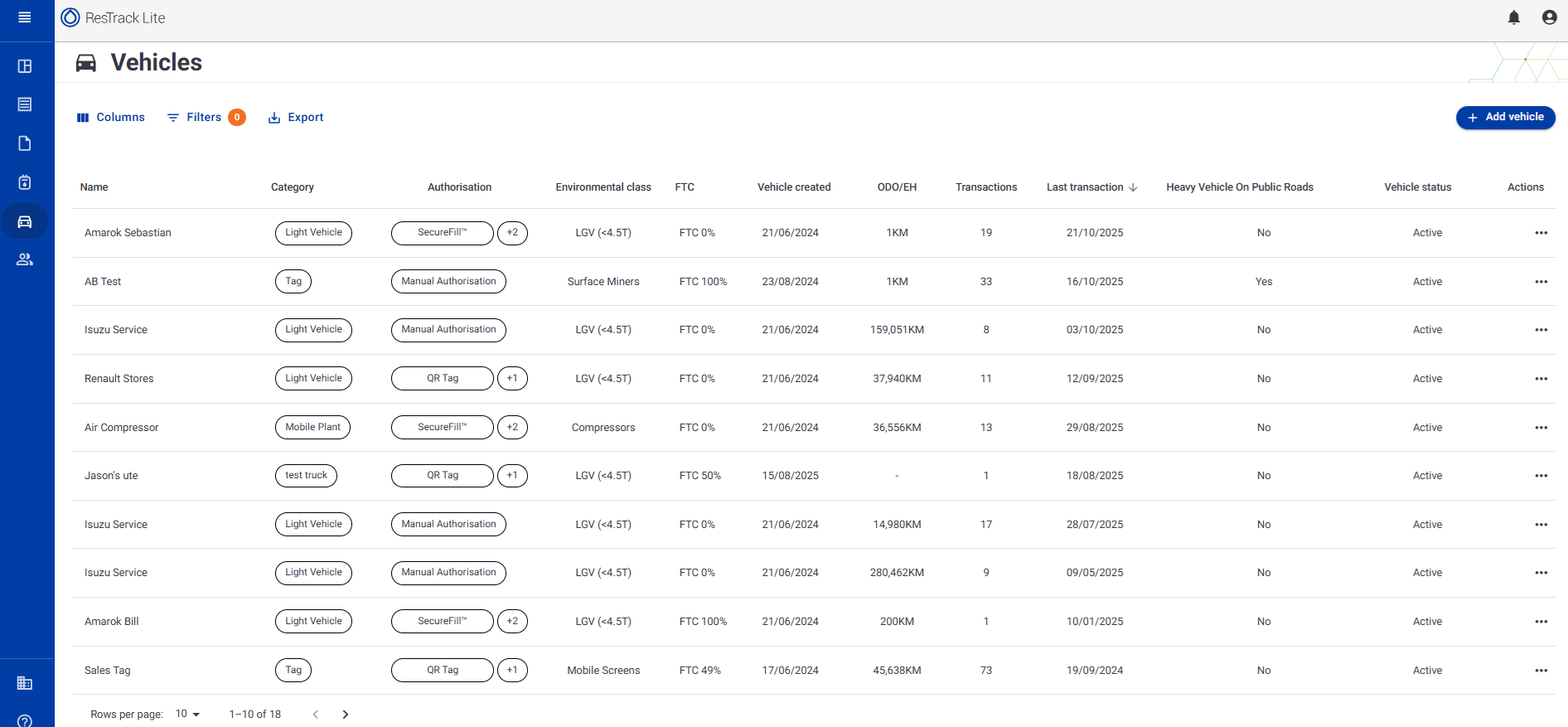
Viewing Vehicles
Navigate to Dashboard → Vehicles to access the full vehicle list.
The table provides a comprehensive overview of all vehicles currently registered in the system.
| Column | Description |
|---|---|
| Name | The registered name of the vehicle. |
| Category | The vehicle classification (e.g., light vehicle, compressor, surface miner). |
| Authorisation | Indicates the configured authorisation method used for refuelling (e.g., SecureFill, QR Tag, or manual selection). |
| Environmental Class | Specifies the vehicle’s environmental classification. |
| FTC | Displays whether the vehicle is eligible for Fuel Tax Credits (FTC). |
| Vehicle Created | Date the vehicle record was created in the system. |
| ODO/EH | Shows the vehicle’s current reading — either odometer (distance) or engine hours, depending on configuration. |
| Last Transaction | The date of the last fuel or data transaction associated with the vehicle. |
| Heavy Vehicle on Public Roads | Indicates if the vehicle operates as a heavy vehicle on public roads (used for FTC and reporting). |
| Vehicle Status | Displays whether the vehicle is currently Active or Inactive. |
| Actions | Provides quick access to view, edit, or manage the selected vehicle. |
Adding a New Vehicle
Click the Add vehicle button (top right corner) to create a new vehicle record.
This opens the Add Vehicle dialog, where you can define all necessary details.
Add Vehicle Fields
| Field | Description |
|---|---|
| Vehicle Name | Enter the display name for the vehicle. |
| Vehicle Category | Select or enter the vehicle’s category (e.g., LGV, Surface Miner, Compressor). |
| Environmental Class | Specify the applicable environmental classification. |
| Fuel Tax Credit Eligibility | Indicate whether the vehicle qualifies for fuel tax credit reporting. |
| Heavy Vehicle Used on Public Roads | Tick this checkbox if the vehicle operates as a heavy vehicle on public roads. |
| Odometer / Engine Hours | Choose whether the vehicle records distance travelled (Odometer) or engine runtime (Engine Hours). |
| Authorisation Method | Select one or more methods used for refuelling authorisation: SecureFill, QR Tag, and/or Manually Select. |
Once all fields are completed, click Save Vehicle to finalise and register the vehicle in the system.
Exporting Vehicle Data
You can export the vehicle list by clicking the Export button.
Exports include all visible fields and can be used for record-keeping, compliance, or fuel management reporting.